Manage your wedding guest list online
From the first invitation to the final head count, every wedding RSVP arrives in one place.
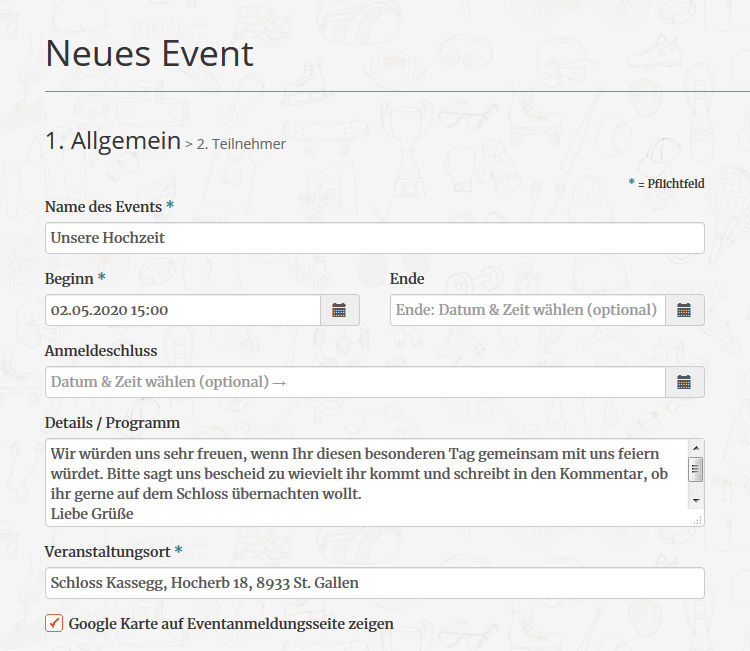
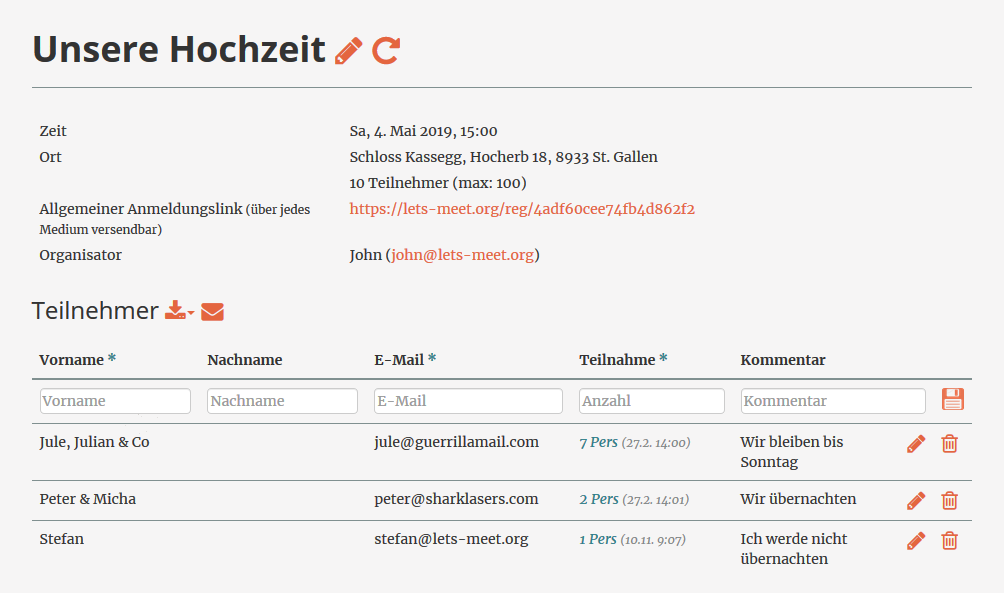
The closer the wedding day comes, the more replies arrive by WhatsApp, by email and over the phone. With Let's Meet they all run into one digital guest list that updates itself and that both of you can look at whenever you like. Keeping track becomes the easy part of the planning!
Done!
You always know who is coming!
Let's Meet is free for up to 100 guests!
A wedding guest list spreadsheet is quickly set up and, three weeks later, exists in two versions on two laptops. The digital guest list always shows the same state instead: who has accepted, who has declined and who has not answered at all. Both of you look at the same list, and for the venue or the caterer you export it back to Excel with one click.
Your guests reply through a link or a QR code in a few clicks, without an account of their own. Anyone who has not reacted after two thirds of the reply period receives a friendly reminder automatically. That lifts the response rate noticeably, and the acceptance from the grandparents, who would rather ring you, is one you simply enter in the wedding guest list yourself.
A wedding RSVP is about more than coming or not coming. Menu choice, the names of plus ones, how guests travel and whether they need a hotel room can all be added as your own fields. Every answer then sits in the same list instead of spreading across three channels. That also leaves you with the basis for the seating plan and the catering numbers, without having to ask a second time.
If the drinks reception starts later or the meeting point changes, you edit the event once. Every guest who has already replied is informed automatically and finds the current schedule, the directions and your notes on dress code or gifts on the event page at any time.
Once the stationery, the colours and the theme are settled, the online RSVP should not be the one thing that looks out of place. From the basic package onwards you design the RSVP page and the email invitations yourself, with your own images, colours and wording (see an example). A QR code is then enough on the printed invitation card, and all the details stay editable online, even when not everything was final at the time of printing.
The basic package also includes your own fields for the RSVP form, for menu choice or a hotel room for example, as well as up to 350 invitations and registrations per month instead of 100.
Order the basic package now for only 28 EUR excl. VAT and use it for 2 months!
Start by collecting all the names in groups: close family, wider relatives, the wedding party, close friends, other acquaintances, colleagues. That gives you a wish list, which you then match to your budget and to the capacity of the venue. In Let's Meet you set up these groups as email distribution lists and can still move people into another group later. When you send the wedding invitation, you decide which groups are invited. The digital guest list then fills itself with every reply that comes in.
As a rule of thumb, six to eight months before the wedding, and rather eight to twelve months for a wedding abroad. If the venue or the hotel allocation is not settled yet, send a save the date earlier and the full invitation later. It makes sense to set the RSVP deadline six to eight weeks before the wedding day, so that you can plan the seating plan and the catering in good time.
RSVP stands for the French répondez s'il vous plaît, which means please reply. The note on the invitation asks your guests to accept or decline by a set date. Instead of a reply card in the post, a link or a QR code is enough today, and guests confirm in a few clicks.
Most weddings cost nothing at all. The free version covers the digital guest list, personalised invitations, automatic reminder emails and the Excel export. The basic package costs 28 EUR excl. VAT for a term of 2 months and pays off as soon as you want to design the RSVP page in your own wedding style or ask for additional fields. The additional fields stay visible on the participant management page once the package has expired. Anyone inviting more than a hundred guests needs the basic package as well.
From the basic package onwards you design the RSVP page and the email invitations with your own colours, images and wording to match your stationery. The online RSVP then reads like a part of your wedding stationery instead of a form from somewhere else.
Yes, from the premium package onwards. The event registration is embedded directly in your existing wedding website, so your guests do not have to move to another site in order to accept. The replies still arrive in the same guest list. On top of that, the invitations can be sent through your own mail server.
Yes, from the basic package onwards you create your own fields for the event registration, for example menu choice, the names of plus ones, how guests travel or whether they need a hotel room. All the answers sit in the same guest list and can be exported to Excel for the venue and the caterer.
No. Your guests open the link or scan the QR code, enter their reply and are done. Neither a registration nor an app is needed. Anyone who would rather ring you, the grandparents for example, can be added to the online guest list by you directly.
The application and the data are hosted on servers in Germany. The names, contact details and menu choices of your guests are personal data, which makes the storage location just as important here as it is for business events.